Visual programming with no-code solutions for the digital twin

In today’s data-driven world, digital twins are essential for optimizing processes and boosting efficiency. However, many businesses struggle to get started, especially when specialized resources are unavailable. This is where Power Apps comes into play: a purely visual development tool for creating digital twin applications that requires no in-depth programming knowledge.

Power Apps: A simple and effective programming foundation

Power Apps is built on the JavaScript library Blockly, which provides a visual programming interface. Users can implement programming concepts like variables, loops, and logical expressions using graphical blocks – no coding required. This intuitive approach enables them to create digital twins with just a few clicks.

CONTACT Elements: The platform for digital twins

Power Apps is part of the CONTACT Elements platform, which seamlessly connects all data and processes from the initial idea to the recycling of a product along the digital thread and accelerates digital transformation. Users can create, manage, and optimize digital twins of products, systems, or processes – customized and without complex backend programming.

Easy integration of simulations, data analytics, and AI

With Power Apps, automated interfaces to existing systems and data sources can be implemented more quickly, streamlining data flow to the digital twin. Python scripts enhance the platform with advanced algorithms for simulations or machine learning (ML). Libraries like TensorFlow or Pandas allow for precise predictions of machine and system states. Based on this, simulations offer a targeted analysis of various scenarios and their effects on systems.

Results such as KPIs or time series data can be integrated into business processes in the Elements platform – perfect for industries like manufacturing, healthcare, or energy that rely on accurate forecasts.

Flexibly adapt applications

The intuitive user interface of Power Apps makes it possible to develop customized applications and adapt them to specific requirements with just a few clicks. Data from documents, sensors, or simulations can be processed, calculated, and visualized directly on the digital twin’s dashboard.

No more IT barriers or complex approval processes

Power Apps requires no complex IT tools or approval processes. Users can create, customize, and share applications directly in the CONTACT Elements platform, allowing them to react quickly to new requirements.

Conclusion

Visual programming with innovative solutions like Power Apps in CONTACT Elements makes it easier to create and automate applications for digital twins. Without the need for extensive IT infrastructure, digital twins become accessible to businesses of all sizes.

Key benefits at a glance:

  • Rapid development: Iterative adjustments and real-time user feedback.
  • Optimization through simulation: Incorporate insights from analyses directly into models.
  • Integration into business processes: Seamlessly embed results into workflows or service cases.

The simple and flexible creation of digital twins opens up new opportunities for companies to increase efficiency and drive innovation.

CAD visualization in Cloud PLM

The benefits of an integrated 3D viewing solution 

As a CAD designer, you surely remember the impractical blueprints, the endless meetings, and the guesswork about how part A should actually fit together with part B. With CAD visualization, those days are finally over. 

In digital product development, fast and straightforward access to CAD models is crucial. Often, companies face the challenge that CAD models can only be opened and analyzed with special viewers or expensive CAD licenses. This is where the 3D viewer integrated into Cloud PLM comes in – an innovative solution that allows you to visualize, analyze and annotate CAD models. 

We will explain here the advantages a 3D viewer offers and why it makes sense to be directly integrated in Cloud PLM: 

What is a 3D Viewer?

The 3D viewer is a web-based application that allows CAD models to be displayed, measured, and annotated in three dimensions. The solution opens up new possibilities for collaboration between engineers, designers, suppliers and other stakeholders. 

Applications for CAD visualization

  • Product development: Designers and engineers can analyze and improve models faster.
  • Supplier and customer communication: Models can be shared and discussed without partners needing special CAD software.
  • Quality assurance: Testing and approval processes are accelerated by direct measurement in the cloud and the commenting function.
  • Technical support and maintenance: Technicians can access 3D models to identify spare parts or perform repairs.

Advantages of 3D viewers Integrated directly into Cloud PLM

1. Cross-CAD system support:

The 3D viewer can display models from different CAD systems, for example, SolidWorks, CATIA, Siemens NX, or Autodesk Inventor. No native software is needed for this. 

2. No CAD viewer licenses required:

Access to CAD models is often associated with high licensing costs. 3D viewers integrated in Cloud PLM eliminate this hurdle, as no additional licenses are required. This saves costs and makes it easier to provide the software to a large group of users. 

3. Measurement and analysis:

With the 3D viewer, users can measure models directly in the cloud, create cross-sections, and perform analyses. This enables a quick verification of dimensions and tolerances even without access to a CAD system. 

4. Collaborative annotation and feedback:

The tool allows users to leave comments and annotations on specific areas of a 3D model. Teams collaborate more efficiently and discuss changes directly on the object. 

5. Easier tracking of version status:

The 3D viewer is fully integrated into a cloud-based PLM system. CAD models are called up and edited from within the PLM software. This facilitates management and ensures access to the correct version status. 

What is CONTACT Elements 3D Connect?

CONTACT Elements 3D Connect offers a comprehensive 3D visualization solution that is integrated into the CIM Database Cloud PLM system. Employees from other specialist departments do not need to install any additional software, but use the viewer directly via the cloud platform. The tool automatically generates a 3D representation based on the checked-in CAD models and offers direct access to CAD model data, parts, variants, product structures and bills of materials. You can use measuring functions, exploded views and redlining and save snapshots of selected views. Color codes reflect component properties such as the release status directly in the model. 

Conclusion

The integrated 3D visualization in Cloud PLM removes barriers, reduces costs, and accelerates processes. Cross-CAD system support, the elimination of licenses, as well as the analysis and commenting functions simplify collaboration between all parties involved and increase efficiency. Integration into a cloud-based PLM system ensures that the latest version statuses are always available and product development is optimally supported. 

Learn more about the possibilities of 3D Collaboration in CIM Database Cloud.

Sustainability as a competitive edge: one step ahead with PLM

Sustainable thinking is no longer a “nice-to-have” – regulations and customer demands have made it a central pillar of modern innovation. A growing number of companies are realizing that ecological responsibility and economic success can go hand in hand. This is especially evident in product development: where cost-effectiveness used to dominate, sustainability has emerged as another key factor.

The right balance between economic and ecological aspects

While cost and efficiency remain crucial, staying competitive in the future requires taking the environmental balance into account when making business decisions. The challenge lies in finding the right balance between economic performance and ecological responsibility. This is most successful when sustainability is considered from the very beginning – at the design stage – rather than at the very end.

Why the product development process is crucial

Around 80% of a product’s environmental impact is already determined during the development phase. Decisions about materials, manufacturing processes, energy use, and recyclability made during this stage play a decisive role. Leveraging reliable and transparent data in the decision-making process enables companies to lower the environmental impact of their products.

LCA vs. PCF: Two key terms briefly explained

Anyone involved in sustainable product development will inevitably encounter these two concepts:

  • Life Cycle Assessment (LCA): The assessment of a product’s environmental impact throughout its lifecycle, from raw material extraction to disposal.
  • Product Carbon Footprint (PCF): The environmental footprint of a product, expressed in CO₂ equivalents. The PCF is often part of a broader LCA.

Implementing sustainability directly in the PLM system

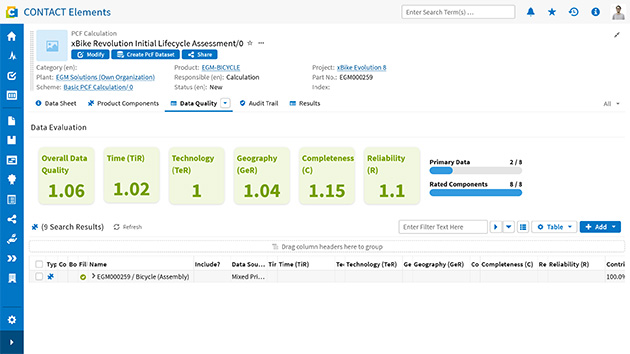
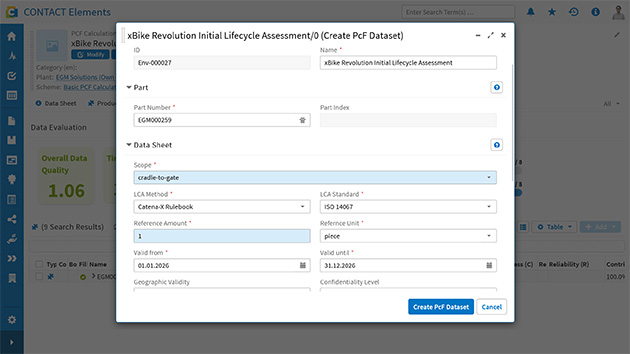
CONTACT’s sustainability solution allows this environmental data to be recorded and used directly in CIM Database PLM. This enables a systematic evaluation of materials, processes, and product structures. Whether entered manually or imported automatically from environmental databases, a product’s environmental impact can be analyzed and improved directly within the system.

Asset Administration Shell: a key to data exchange in the supply chain?

Sustainability is not a solo effort. Especially for complex products involving multiple suppliers, effective data exchange is crucial. This is where the concept of the Asset Administration Shell (AAS) comes into play – a standardized representation of digital twins for industrial components.

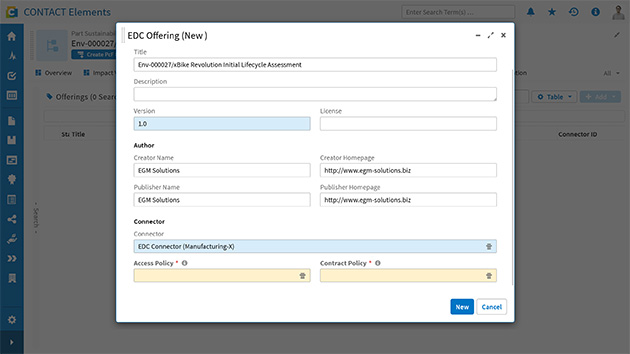
Using AAS submodels like the Carbon Footprint, companies can communicate environmental data in a standardized way, both internally and externally. This creates a seamless data foundation across the entire value chain. Using submodels like the Carbon Footprint, companies can communicate environmental data in a standardized way – both internally and externally, enabling them to integrate data from purchased components.

Three key takeaways:

  1. Sustainability starts with engineering, where crucial decisions are made.
  2. Standardized data formats enable the integration of environmental data into the product lifecycle.
  3. With IT tools like CONTACT Elements Sustainability Cloud, companies can not only plan eco-friendly operations but also implement sustainability early in the development process.

Conclusion

Developing sustainable products is no longer a vision for the future – it’s a reality today. Companies that adopt the right tools at an early stage and rely on standardized processes gain not only ecological advantages but also economic benefits.