
When deciding whether to upgrade your Product Lifecycle Management (PLM) system or implement one for the first time, the benefits are clear: more efficient processes, faster time-to-market, and improved collaboration. However, once you discuss features and use cases, another critical question arises: what does it actually cost, and which option is more cost-effective in the long run?
Choosing between Cloud PLM and traditional On-Premises PLM is often a balancing act between initial investment and ongoing operational costs. This article examines the costs of Cloud PLM vs. On-Premises PLM.
The traditional approach: On-Premises PLM
On-Premises PLM refers to purchasing and running the software on your own IT infrastructure. While it requires a high upfront investment, it gives you complete control over your system.
Upfront costs:
- Software licenses: Typically, the highest cost. You buy perpetual licenses granting unlimited use. Prices vary depending on vendor, functionality, and number of users.
- Hardware infrastructure: Powerful servers, storage, network components, and backup systems are necessary and must scale for future growth.
- Facility costs: Server rooms with proper cooling, power supply, and security systems are essential.
- Implementation and customization: Installation, configuration, data migration, and process customization often require external consultants and internal resources.
- Training: Comprehensive training for administrators and end-users is essential to maximize system efficiency.
Ongoing Costs:
- Maintenance and support contracts: Annual fees for updates, patches, and technical support typically amount to 15–25% of the original license cost.
- IT staff: Dedicated IT personnel are needed for maintenance, troubleshooting, security, backups, and performance optimization.
- Hardware maintenance and replacement: Servers and storage must be regularly maintained and replaced.
- Energy costs: Running servers and cooling systems generates ongoing electricity costs.
- Security measures: Antivirus, firewalls, and regular penetration testing are required for data protection.
- Upgrades: Major version upgrades can be as complex as re-implementation, often involving adjustments, intensive testing, and retraining.
The flexible option: Cloud PLM
Cloud PLM (often offered as Software-as-a-Service, SaaS) provides the software and infrastructure via a third-party provider, usually requiring lower upfront costs.
Upfront costs:
- Setup fees (optional): Some providers charge a one-time fee for account setup or initial configuration.
- Implementation and customization: Configuration, data migration, and process-specific adjustments are necessary but often less extensive than On-Premises due to prebuilt infrastructure and standardized workflows.
- Integrations: Connecting to existing On-Premises systems may require integration projects with associated costs.
- Training: Training is still needed, but intuitive interfaces and online resources can reduce effort.
Ongoing costs:
- Subscription fees: The primary cost. Monthly or yearly fees per user usually include software, infrastructure, updates, and basic support.
- Scalability: Adding or removing users or storage is flexible and reflected in subscription fees.
- Premium support/add-ons: Extra charges may apply for advanced support, additional features, or storage.
- Customizations/integrations: Ongoing adjustments or new integrations may incur service fees.
- Internet access: Reliable, high-speed internet is essential and should be factored in, even if already available.
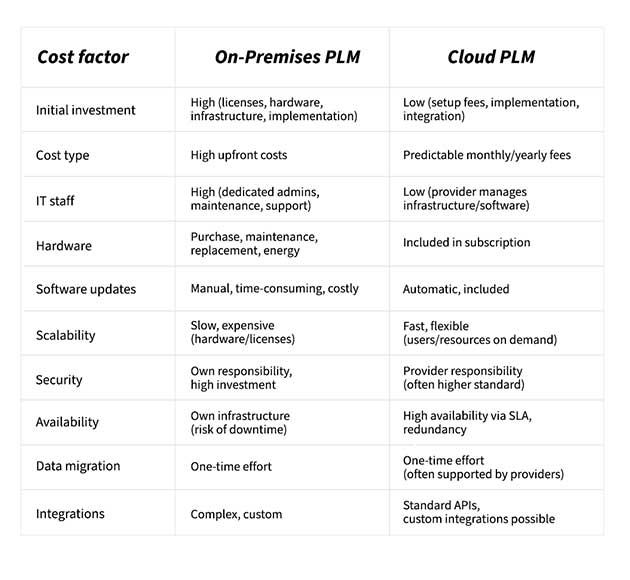
Direct Cost Comparison
Evaluating total costs over 5–10 years is crucial for an informed decision.
Conclusion
The optimal solution depends on your company’s specific needs:
- Small and medium-sized businesses (SMBs): Cloud PLM is often more cost-effective, offering low upfront costs, predictable monthly fees, and reduced IT workload. Tools like CONTACT Software’s Cloud PLM system provide scalable, flexible solutions and even free trials to experience cloud-based PLM firsthand.
- Large enterprises or companies with complex requirements: On-Premises PLM may remain preferable, offering maximum control over data and systems if sufficient IT resources are available. High upfront costs can be justified over long-term usage.
Interested in PLM and cloud technologies? The “Engineering Compass” newsletter highlights the latest trends and provides valuable insights for companies looking to make their digital product development more efficient, innovative, and future-ready.