Data migration to Cloud PLM systems

Challenges and best practices for successful data migration 

More and more companies are adopting cloud-based PLM systems to streamline their product development processes. Whether they are already using an on-premises PLM system and want to switch to a cloud solution or implementing a Cloud PLM system for the first time, one of the biggest challenges is the smooth and secure data migration.
How can this data be reliably transferred to the new system? In this blog post, we examine the challenges and best practices for successful data migration to Cloud PLM systems and offer tips on ensuring a smooth transition without data loss.

What challenges arise during data migration to Cloud PLM systems?

Migrating data to Cloud PLM systems, obstacles can present hurdles that complicate and delay the entire process:

  1. Data quality and consistency
    Legacy data is often incomplete or inconsistent. Missing attributes, invalid values, or duplicate records can hinder the migration process. Particularly with CAD models, missing files or broken references may prevent models from being imported completely
  2. Data scope and complexity
    Depending on the scope and complexity of the data being transferred, the migration process can be very time-consuming. Large datasets, such as entire version histories of CAD data or multi-level BOMs, require significant computing resources and can slow down the migration.
  3. Structural differences between systems
    Data structures in the new Cloud PLM system may differ from those in your legacy system. Attributes, data fields, or relationships between records may be organized differently, requiring data transformation or restructuring before import.
  4. Technical challenges
    Migrating data to a Cloud system brings specific technical issues. For example, along with ensuring file format compatibility, sufficient network bandwidth and data transfer rates must be guaranteed.
  5. Security and compliance requirements
    Strict security and compliance regulations must be followed when transferring sensitive data to the Cloud. Data must be encrypted during transport and storage, and data protection laws such as GDPR must be adhered to.

What key questions should you address before data migration?

Data migration is often underestimated, although it is one of the most critical tasks before a new PLM system goes live. You should address several key questions early to import your legacy data successfully.

First, determine which data objects will be transferred to the new system: Are you migrating CAD assemblies, parts and BOMs, office documents, or projects? It’s also essential to define the scope of the data: Do you want to migrate data from a specific project, a product, a specific company location, or the entire data archive?

You should also decide how much historical data you want to migrate. Do you want to transfer only the latest version or all versions, including the complete audit trail and engineering changes? These aspects are crucial as they influence the scope and complexity of the migration.

You should also carefully examine the content of the data itself. Consider whether all attribute values and CAD parameters are needed or if it’s sufficient to import only some of them. This is important to define which data should be stored in which objects and attributes in the target PLM system.

What makes data transfer with CIM Database Cloud so simple?

  1. User-friendly import tools
    The cloud-based PLM system CIM Database Cloud offers powerful, easy-to-use import tools specifically designed to simplify the migration process. They allow you a quick and efficient import of configuration data such as field selection values (e.g., dropdown fields), as well as PLM data such as CAD documents, parts, BOMs, office documents, projects, and requirement specifications.
  2. Support for various file formats
    CIM Database Cloud supports a wide range of file formats and data sources, making it easy to  import different data objects. These include Excel files, CAD formats, and the ReqIF format for requirement specifications.
  3. Automated validation processes
    CIM Database Cloud includes built-in validation mechanisms that help identify and correct potential errors during the import process. These functions automatically check whether the data is complete and consistent during import, contributing to high data quality.
  4. Iterative Migration Approach
    The platform supports an iterative migration approach, allowing you to import and test data step by step. This helps identify and resolve potential issues early on, without affecting the migration process. This approach reduces the risk of errors and accelerates data migration.
  5. Comprehensive Documentation and Support
    Alongside the migration process, CIM Database Cloud offers extensive documentation and tutorials. These contain clear instructions and examples on how to import and configure different data types. Additionally, customer success managers are available to assist if needed.

Conclusion

Data migration to cloud-based PLM systems is often fraught with many challenges. Successful data migration, therefore, requires careful planning, considering aspects such as data quality, scope, structural differences, and security requirements.
CIM Database Cloud enables you to efficiently migrate your PLM data and make your product development processes future-proof . With user-friendly import tools, support for various data formats, automated validation processes, and comprehensive documentation, companies can ensure the seamless and secure integration of their existing data. An iterative migration approach, combined with extensive preparation, minimizes risks and guarantees a smooth transition to the new system.

Five project management issues that software must solve in the industry

What can software accomplish in engineering projects? What typical project management problems do digital tools have to solve in industry? Which functions are required for this? And how can small and medium-sized companies manage digitalization in this area with relatively few resources? 

Project management software becomes essential

The requirements for product development are continuously increasing. This is driven by the growing share of electronics and software components, the high number of product variants, as well as new laws and compliance regulations. All of this inevitably impacts the complexity of engineering projects. Therefore, project management issues, particularly those affecting small and medium-sized enterprises (SMEs), can no longer be resolved without digital support.

Which problems must software solve in engineering projects?

Digital tools for project management are abundant: from Excel spreadsheets and SharePoint to dedicated software solutions. However, SMEs in the industry often encounter limitations with these tools. This becomes apparent when examining five common problems that suppliers face in project management:

1. Lack of transparency

It is crucial for the success of industrial projects that everyone involved has access to up-to-date project and product data at any time. Such a data foundation requires software that can be connected to all data sources in the development organization (ERP, CAD, CAx, etc.) via interfaces. Project management tools without integrated data management cannot achieve this.

This leads to various problems. Project participants often work with isolated solutions that are used only in specific departments, locations, or companies. The resulting lack of interfaces forces team members to exchange information manually, for example, through emails or SharePoint.

This approach generates a lot of work. Data must be continually updated, which distracts employees from more important tasks. Additionally, they need to regularly exchange information about the current status of the data. It is also common for data to get lost among the multitude of emails so that it has to be requested manually.

All of this creates delays that negatively impact project progress, costs, productivity, and customer satisfaction.

2. Significant risk of manual errors

If project teams do not have access to a consistent data foundation, the risk of misunderstandings during data exchange increases. When product and project data have to be entered manually into documents or spreadsheets, it is only a matter of time before transfer errors occur.

In the industry, such errors can have serious consequences. For instance, a transposition error made by an engineer can affect ordering processes in procurement. Similarly, the design team might develop their designs based on incorrect or unclear product data.

Such mistakes are not just annoying. They jeopardize the success of the project, drive up project costs, and damage the company’s reputation with customers and partners.

3. Limited flexibility for spontaneous changes

In development projects, it is not uncommon for customers to spontaneously change the requirements for a product. This often creates chaos, especially in small and medium-sized companies. To implement these changes, close coordination with the customer’s interdisciplinary teams is essential. Furthermore, suppliers must optimally time their own supply chains and implement changes as quickly as possible.

Both skills require flexible processes and clean data handling. Project managers must be able to plan and implement necessary processes at short notice, even after the project has started. In addition, data statuses must be precisely documented and reconciled between the departments and companies involved.

Otherwise, changes become expensive and time-consuming. For example, today only a few suppliers still use prototype tools. Instead, due to tight project timelines, they immediately move to steel and iron. This approach is faster but creates significant difficulties in the event of changes, which could be avoided through greater flexibility.

4. Experience-based knowledge is not used systematically

Insights gained from a customer project are rarely incorporated into the planning and execution of subsequent orders. This often impacts costs. For example, factors that caused delays in working with customers or partners are not considered when preparing the next quote. As a result, expensive mistakes or misunderstandings frequently occur.

When companies do not systematically document insights and lessons learned – which is not possible with every project management tool – the dependency on individual employees increases. For instance, during the COVID-19 pandemic, many experts left their companies due to poor order volumes. This loss of knowledge is particularly difficult for smaller businesses to compensate for in times of skilled labor shortages. In many companies, it still has an impact today.

5. New requirements due to laws and regulations

New laws and regulations bring numerous additional requirements for traditional industries. Many of them are aimed primarily at large companies. These, however, have to pass on specific requirements to their suppliers and partners.

Processes that companies have successfully used for decades no longer work under these circumstances. At the same time, suppliers lack the know-how and resources to adapt to the new conditions. For instance, customers are increasingly demanding that suppliers provide the carbon footprint of the parts they produce. This requires suitable processes and IT systems that companies must integrate alongside their day-to-day operations.

Laws and compliance requirements will continue to change the industry in the coming years. Those who ignore this trend risk losing their customers and, in the worst case, even face legal consequences.

What if companies ignore common mistakes in project management?

Project management software that is designed to meet the requirements of the industry must be able to solve these problems. If it doesn’t, project planning, management, and controlling will suffer, as will collaboration between project teams and external stakeholders. The results are

  • financial losses,
  • waste of resources,
  • delays,
  • unsatisfied customers,
  • loss of reputation,
  • frustrated employees,
  • internal tensions within the project team, and (in worst-case scenarios)
  • legal consequences.

Outlook

Many of the problems described in this article will become more pressing in the next few years. This is due to new laws and compliance requirements, but also the increasing use of new technologies. To address these issues, effective communication, efficient data exchange, integration of project and product data, and a high degree of standardization are essential. For this, you need software that not only offers project management functions but also includes PLM (Product Lifecycle Management) capabilities.

Our software CIM Database Cloud is such a solution. It is a powerful PLM tool that helps companies with product development as well as project management. The project management functions enable you to link schedules, tasks, and documents and support project managers in completing projects on time and budget. The cloud solution also makes it easier to connect globally distributed locations and implement laws and regulations.

Microsoft Office for the web™ integration in Cloud PLM

How the integration simplifies document management in Cloud PLM

Pioneering technologies and digital innovations are shaping today’s economy. Seamless collaboration within companies is an essential factor for success. Product Lifecycle Management (PLM) supports this and helps increase efficiency. This is where the integration of Microsoft Office for the web™ in Cloud PLM comes into play. The integration of PLM systems and Microsoft Office not only promises an optimized way of working but also a smooth workflow that takes collaboration and productivity to a whole new level.

In this interview, André Guldi, Product Manager Cloud at CONTACT Software, explains the differences between document management with MS Office and in Cloud PLM, as well as the benefits of integrating Office for the web™.

André, how does document management differ in MS Office and Cloud PLM?

AG: MS Office has become the standard for creating documents, spreadsheets, and presentations because of its ease of use and extensive editing capabilities. However, documents are usually stored at the file level, which can lead to an unstructured data landscape. There is often no proper version control, leading to confusion and uncertainty about which documents are up-to-date. Many copies of the same document can be in circulation at a company, which makes collaboration and traceability difficult.

In Cloud PLM, this is different: its document management functionality offers a comprehensive solution. It establishes a “Single Source of Truth” for any type of document – a central, reliable storage location for documents. Managing metadata and file attachments allows for the structured organization and quick identification of documents. Additionally, extensive versioning, release workflows, and access control enhance document control. Search functions not only scan file names but also metadata and, using full-text search, even the content of the files. This simplifies finding documents and saves valuable time. Another significant advantage of document management in Cloud PLM is audit-safe storage. It is clear to users at first glance which document is currently valid, thus avoiding confusion or incorrect use.

What is Microsoft Office for the web™?

AG: Microsoft Office for the web™ (formerly Office Web Apps) is a web-based application that facilitates working with Office files. It allows users to open Word, Excel, OneNote, and PowerPoint documents directly in a web browser. The device used only requires a supported browser, an active internet connection, and users need a suite license. This allows them to use the full functionality of the web-based Office applications. This license not only allows them to gain access to documents but also to edit and share them with others – conveniently through the web browser without installing the Office Suite on their computer.

What are the benefits of integrating Office for the web™ into Cloud PLM?

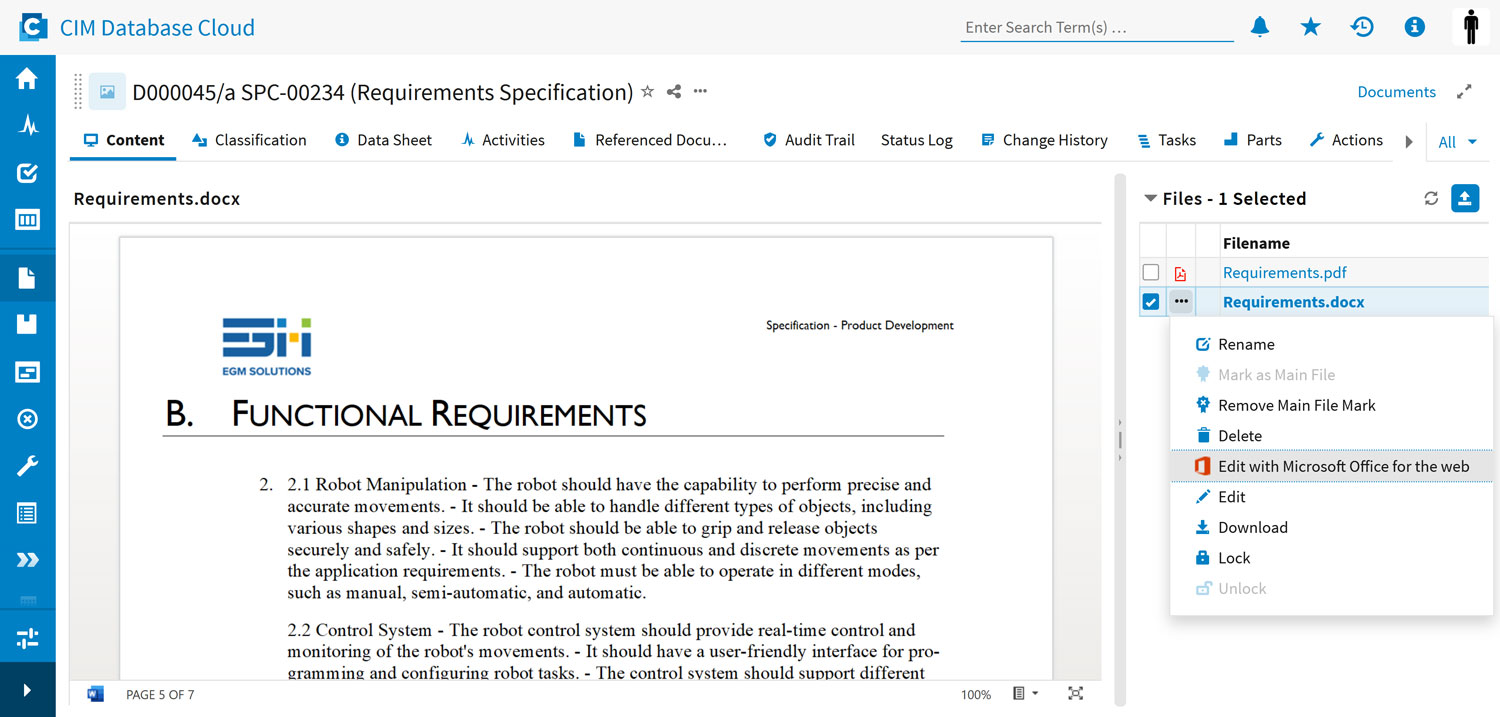
AG: Microsoft Office for the web™ is seamlessly integrated into the Cloud PLM web interface. This allows users to create, view, and edit Office documents directly without the need to save them separately. They are saved in the Cloud PLM file storage, also known as Blobstore. This feature allows multiple people to work on the same document simultaneously without relying on local installations of MS Office.

A key feature is that only a single file exists, which simplifies file management and ensures a clear structure. The solution combines the advantages of an online Office editor with centralized and legally compliant document management in the PLM system: avoiding additional programs, eliminating file transfers, and enabling collaborative editing with version tracking, release workflows, and access control. This ensures efficient and secure document management.

What makes the connection between Office for the web™ and CIM Database Cloud special?

AG: CONTACT Software is the first software provider to offer the Office for the web™ integration in a Cloud PLM system. To edit an Office document in CIM Database Cloud, customers need an Office for the web™ suite license.

Conclusion

Microsoft Office for the web™ provides companies with an efficient solution for document management. It enables users to directly create, view, and simultaneously edit Office documents. The integration saves files directly in the Cloud PLM file storage, promotes collaborative work without local MS Office installations, and ensures a clear structure through a single file. This solution combines the advantages of an online Office editor with centralized document management in the Cloud PLM system, including versioning, release workflows, and access control for efficient and secure document management.

Discover CIM Database Cloud now – the first Cloud PLM system that enables the seamless integration of Microsoft Office for the web™.